
 Default


Can I cancel my purchase?
| By Credit Card If you want to cancel your purchase, you can go to "Your Account" page first, then click the link "Cancel Purchase",and your purchase will be cancelled from next stage. For example, you purchased our service on June 21,2007, so the payment will automatically occur on the 21st of every month. If you do cancel your purchase on Sep 15,2007, your payment will stop on Sep 21,2007, and you can't use our service any longer from that date on. Unfortunately no refunds can be made less than 14 days each month. |
| By Paypal 1. The user log in his own PayPal account, go to My Account->History.  2. Find the payment record which Type is Subdription Creation and Status is Active. 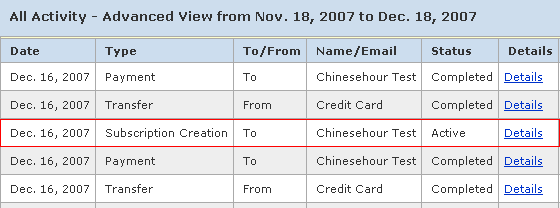 3. Click the link "Details" after the payment record you've find to get in the page with specific payment information, please check whether the Item Name is the service you want to cancel, if there is no mistake, then click the button Cancel Subscription below. 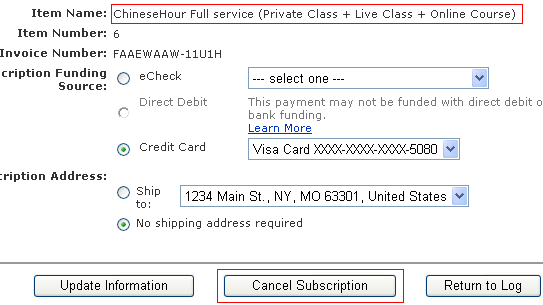 |